
Key Takeaways
- Real-time avatars listen, process a request, and respond during a live interaction.
- A working experience combines speech recognition, AI reasoning, speech generation, animation, and video streaming.
- Fast response time matters, but accuracy, synchronization, and reliability matter just as much.
- Useful applications include training, customer support, education, accessibility, entertainment, and guided experiences.
- Consent, disclosure, privacy controls, and human escalation paths are essential to responsible deployment.
Real-time avatars are digital characters that can engage in a live conversation via voice, text, or sometimes visual input. Rather than playing a finished video, they generate spoken responses and on-screen movement as the interaction unfolds. To see the experience in action, users can talk to an AI avatar in real time and observe how speech, facial animation, and conversation are combined within a single interface. The avatar itself may look like a realistic person, a stylized guide, a brand mascot, or a fictional character. What makes it “real-time” is not its appearance. It is the ability to receive new input, decide how to respond, and deliver an updated audio and video response without relying on a fixed script.
What Is a Real-Time Avatar?
A real-time avatar is a visible digital character that participates in a live exchange. A learner can ask it a question, a customer can describe a problem, or a visitor can request directions. The system then produces an answer with speech, lip movement, facial expression, and sometimes gestures or body movement. This is different from a chatbot that only displays text, a pre-recorded spokesperson video, or a human performer using motion capture. Some avatar systems are fully automated, while others include a human operator who supervises conversations or takes over when needed.
How the Technology Works
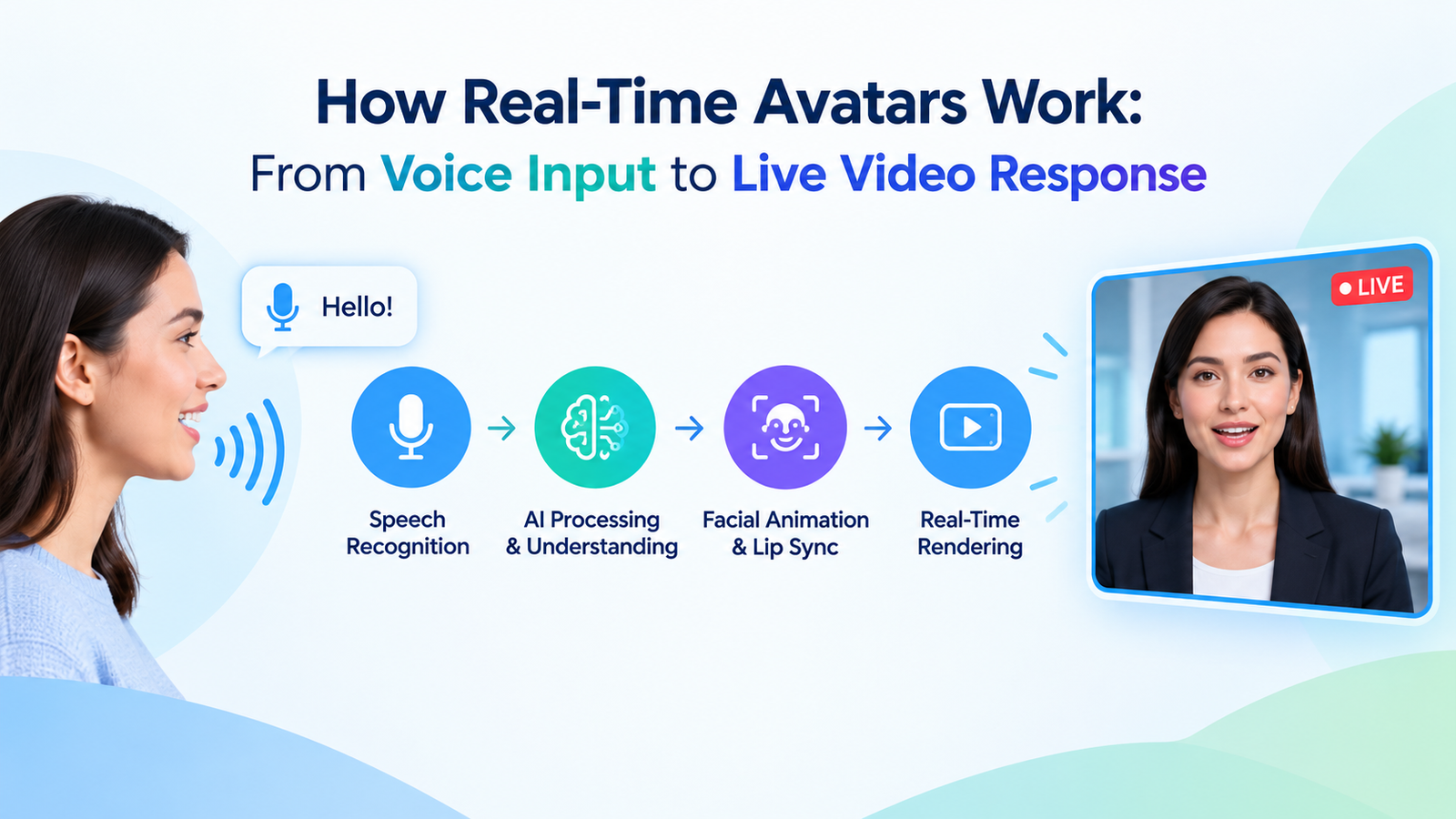
Most real-time avatar systems follow a connected processing loop:
- Input capture: A microphone, keyboard, camera, touch screen, or shared screen collects the user’s message.
- Speech and vision processing: Spoken language is converted into text, and optional visual inputs can be interpreted when the system is designed to use them.
- Reasoning: A language model considers the request, conversation context, system rules, and approved reference materials.
- Voice generation: The selected reply is turned into synthetic speech. Modern speech synthesis systems can generate spoken output from text rather than relying only on recorded phrases.
- Animation: The avatar’s lips, face, gaze, posture, and gestures are synchronized with the response.
- Streaming: Audio and video are delivered to the user’s device as a live experience.
User input → speech recognition → reasoning → voice output → avatar animation → live video
Why Response Speed Matters
Latency is the delay between a user finishing a message and the avatar beginning a meaningful response. A short pause can feel conversational. A long or inconsistent pause can make users wonder whether the system heard them, stopped working, or is unable to answer. Teams should measure more than one speed metric. Useful measures include time to first audio, time to first visible video frame, average response delay, slower 90th and 95th percentile delays, dropped frames, connection success rate, and session drop-off rate. Fast speech is not enough if the video freezes, the lips do not match the audio, or the answer misses the user’s intent.
Real-Time vs. Pre-Recorded Avatars
- Pre-recorded avatars are created before the viewer watches. They work well for announcements, lessons, scripted explainers, and repeatable messages.
- Real-time avatars create or update their response during the interaction. They are better suited to tutoring, guided support, role-play, and live question-and-answer sessions.
- Pre-recorded projects usually prioritize visual polish and message consistency.
- Real-time projects must also manage interruptions, unexpected questions, silence, changing context, and system reliability.
Where Real-Time Avatars Are Used
Customer Support and Guidance
An avatar can explain basic account steps, help visitors find information, or guide users through a known process. Complex, sensitive, or unresolved cases should have a clear handoff to a trained person.
Education and Training
Interactive characters can support language practice, interview preparation, simulated service conversations, and role-play exercises. Their value is strongest when the scenario has clear learning goals and useful feedback.
Accessibility and Public Experiences
Avatars can provide spoken instructions, captions, translated guidance, and hands-free interaction. Museums, events, and public spaces can also use controlled characters to answer common visitor questions. Accessibility features should be tested with people who will actually use them.
How to Plan a Real-Time Avatar Project
- Choose one clear job. Define whether the avatar will teach, guide, support, entertain, or collect information.
- Define the audience. Consider language, technical confidence, accessibility needs, and comfort with AI interaction.
- Set conversation boundaries. Document what the avatar can answer, what it should decline, and when it must transfer a user to a person.
- Use approved materials. Ground responses in current policies, lessons, product information, or knowledge bases maintained by accountable staff.
- Test realistic conditions. Include accents, background noise, interruptions, vague questions, long pauses, and unsupported requests.
- Measure outcomes. Track task completion, user satisfaction, incorrect answers, transfer rates, and technical failures.
Privacy, Safety, and Trust
Users should know when they are speaking with an AI-generated character. Organizations should obtain consent before using a person’s face, voice, likeness, or personal data, and they should explain what audio, video, images, and transcripts are collected and retained. Trust also depends on behavior. The strongest systems acknowledge uncertainty, avoid presenting guesses as facts, protect account and conversation data, and offer a clear path to human support. Research into real-time facial animation also shows why believable digital characters require more than lip-sync, including attention to subtle expression and changing visual conditions.
Trust Signals Users Notice
- A clear label that identifies the character as AI-generated.
- Simple privacy choices and understandable data notices.
- Consistent answers and respectful handling of uncertainty.
- A visible option to contact a human when the issue matters.
What to Watch
Development is moving toward smoother turn-taking, better handling of interruptions, and avatars that can work across voice, text, images, and shared screens. Teams are also seeking more control over gaze, gesture, emotional tone, and multilingual speech. The practical goal is not merely to create a convincing face. It is to create an interface that is useful, responsive, transparent, and dependable.
Frequently Asked Questions
What makes an avatar real-time?
It updates its response during a live conversation rather than playing only a pre-recorded video. It must respond quickly enough for users to maintain a natural exchange.
Do real-time avatars need a human operator?
Not always. Some are automated, but human supervision remains valuable for high-risk requests, quality review, complaints, and escalation.
Are real-time avatars the same as deepfakes?
No. An avatar is an interaction format, while deepfake commonly refers to deceptive or manipulated synthetic media. Misuse can overlap, which is why consent, disclosure, and identity safeguards are necessary.
What is the biggest technical challenge?
The central challenge is coordinating speech recognition, reasoning, voice generation, animation, rendering, and streaming quickly and reliably enough to feel like one continuous conversation.
Conclusion
Real-time avatars bring conversation, voice, animation, and video together in a single live interface, creating a more interactive way for people to communicate with digital systems. They can support online learning, customer service, employee training, and website assistance by providing spoken guidance, answering questions, and helping users complete routine tasks. However, the most effective projects focus on a specific job, dependable information, responsive performance, and clear limits rather than adding technology to make an experience look advanced. A realistic appearance may draw attention at first, but it cannot compensate for inaccurate answers, slow responses, or confusing interactions. Users are more likely to trust and continue using an avatar when it provides helpful information, respects their privacy, and makes it easy to access human support when needed. By prioritizing practical value, accessibility, transparency, and consistent performance, organizations can create real-time avatar experiences that meet user needs and deliver lasting benefits.
