

Have you remembered how certain subjects draws full attention while others made the mind drift within minutes, since building a real connection in a classroom has never come easy for any teacher? Some rely on stories, others sketch diagrams on the board, and in the modern era, when neither approach lands, gadgets education step in for teachers and provide a genuine support system for students, focusing on making learning interactive by offering insightful experiences. Advanced edtech gadgets for education in the classroom are not the future but have already become the present.
The question is, but, which of them is worth using, safe for young learners, and best for a particular age group? This guide does exactly that, and takes you through each of the devices that qualify as best, sorted by age breaking them up in a list so they don’t get lost.
What Do We Mean by Gadgets education?
Electronic devices and digital tools are not viewed as educational gadgets until they are used to improve the teaching and learning or academic communication process. This encompasses tablets, smart pens, AI tutors, connected wearables and interactive whiteboards.
Why Educational Gadgets Matter in Modern Learning
Classroom technology is the answer to closing that gap, and no longer looks the same for all students that have access to a full classroom experience. There are three distinct benefits to this trend towards learning devices.
- Personalization: Adaptive learning software adjusts the difficulty level of the questions as they go, and no one is frustrated or bored.
- Engagement: Quizzes and gamification help to keep the audience engaged more than a lecture.
- Flexibility: Without technology, neither remote nor hybrid learning is possible at all. It’s the infrastructure, not an optional component.
Types of Gadgets Education: You Should Not Miss
Don’t be surprised by looking at the heading; that type of gadget is exactly the right term when the technology is not just limited to shifting from a blackboard monitor. There are a bunch of categories in which we can segment the gadgets education.
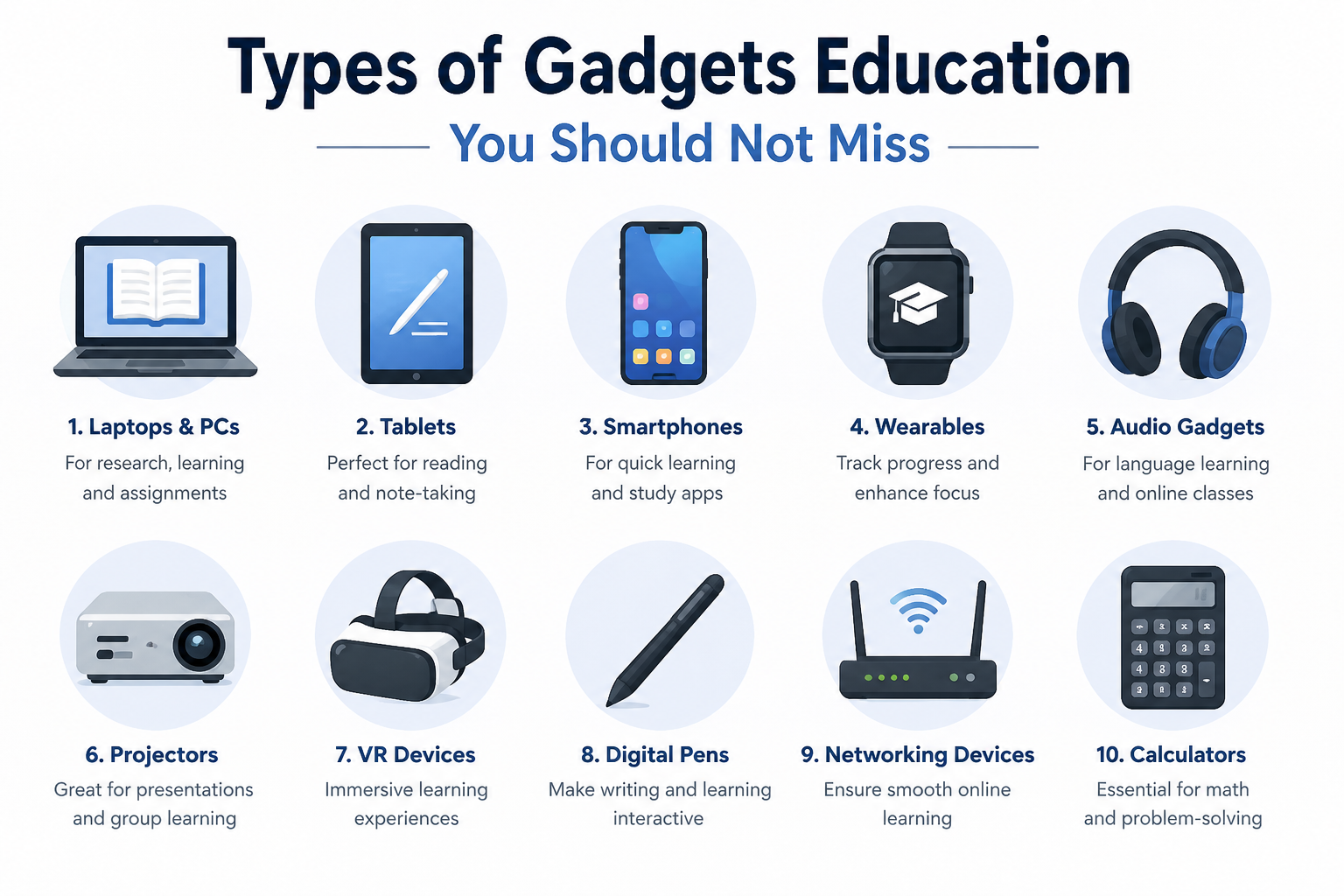
Tablets & E-Readers
Reading materials, a research browser, and note-taking apps: these smart devices do justice to these three. Schools that add on these smart classroom devices often report lower long term material costs, since digital textbooks do not need replacement every school year.
Interactive Whiteboards & Smart Boards
Live lessons stop disappearing the moment class ends once a smart board is in use. But the good news is that recordings of all the interactive design, diagram are saved so you can rewatch. And that single feature, the ability to save and revisit a lesson, is something a traditional chalkboard was never built to offer.
Smartwatches & Wearables for Students
Daily logistics get handled quietly through wearables built for a school schedule. Hence, several schools also rely on wearables for safety check ins during field trips, which gives parents real, verifiable peace of mind.
Smart Pens & Note-Taking Devices
Now that is what surely excites you as well as shock you. These type of digital devices for eduation redefine the completel system and replacing the register and pages.
AI Tutors, Chatbots & Voice Assistants
This is what we can say about the evolution in the education sector with artificial intelligence. AI gadgets for students are the reason why students never fear doubt, confusion, or any practice material, as everything is just a click away from them.
VR/AR Learning Devices
Interactive learning and insightful experiences are some of the words that AR/VR devices do proper justice to. Just think for a moment: a history class walks through ancient Rome instead of reading about it from the books. A biology class rotates a 3D human heart and studies each chamber from your preferred angles. It would be highly commendable when it comes to making a complex topic an easy one.
Document Cameras & Projectors
Physical objects, including handwritten worksheets or lab specimens, get projected for the whole class at once through a document camera. This solves one of teaching’s oldest problems directly: making sure every student, not only the ones seated up front, can actually see each step of a live demonstration.
Best Gadgets for Learning: Top Picks by Age Group
It’s hard for flat lists to consider the fact that a device that works for a 7-year-old might not work at all for a college junior. Most guides on this subject leave out the sorting by age, with a reason enclosed to every pick.
Elementary School (Ages 5 to 10)
Young learners should have tools that are more like a friendly helper than a complicated machine and are designed for a small hand, short concentration span, and lots of safety features.
- Parental Control Basic Tablet. Easy touch controls, parental safety restrictions and durable, kid-friendly casing.
- Class exposure to interactive white board. Maintains early learners’ visual attention without having to use their own device.
- Easy to wear timer / reminder band. Establishes early routines and time awareness at home, without the use of screens.
Middle School: 8th and 9th Grades (Ages 11-13)
Middle Schoolers are becoming more independent, and so should their devices, which should facilitate typing, homework organization, and healthy digital habits, but not become too much for them.
- Entry level tablet or Chromebook. Handles typing practice, research basics, and early digital note taking.
- Smart pen for handwriting to digital transfer. Eases the shift from paper habits into organized digital notes.
- Basic smartwatch for schedule alerts. Reduces missed assignments as workload and class count both increase.
High School (Ages 14 to 18)
- High school puts the pressure on with more challenging courses and the impending test, gadgets here must really work, whether it’s for research or for focused and distraction-free study.
- Laptop for research and long form writing. Becomes critical when essays, group work, and standardized tests become more demanding.
- AI Exam and homework helper app. Provides support outside school hours, step by step when teacher is not available.
- Noise-canceling headphones for research use. Can focus on more difficult, higher level material.
College-aged students and adults
- It’s all about deadlines, lectures, late night studying and the right gadgets can help serve as a good study partner.
- Laptop battery and cloud storage that work. Supports lectures, research and group activities in a single device.
- Capture full lecture with a smart pen. Automatically turns fast-paced note-taking into a searchable digital archive.
- Research and writing tools for AI. Increases the speed of citing, outlining and structuring early drafts.
- Specialized programs, VR/AR headset. For hands-on practice in simulation settings including the field of nursing, engineering, and design.
The number one rule: always purchase for the task(s) a student has the most trouble with, and not for the device that looks cool on a shelf. A student who is losing handwritten work should have a smart pen much more than a VR headset.
Benefits of Smart Gadgets for Education
Decades of one-size-fits-all pacing are solved directly once smart gadgets for education enter daily use, since a single lesson’s speed can now adjust to each learner instead of the other way around.
- A student behind on a topic gets extra repetition without being singled out in front of the class.
- The student who is ahead in the class can continue ahead rather than get bored and lose interest.
- Teachers have real-time assessment data, rather than a week later on a graded test.
- Now, if a student is sick, it does not mean he or she will miss a full day of instruction.
- Daily use of devices develops digital literacy, which is a skill that is carried over from college to the majority of careers.
Education Technology Trends to Watch
The pace is the name of the game this education technology and those schools that get in tune with the changes first will have a leg up on those that lag behind.
- The intelligence algorithms that power adaptive learning continue to “get smarter” at identifying exactly where students are getting stuck and adjusting in real time.
- Gamification is no longer limited to based on points; it is creating fully narrative based lessons, closer to a game than homework.
- Classroom wearables are expanding beyond scheduling alerts into health and safety monitoring during the school day.
- Spatial computing, which blends physical and digital space together, is on track to bring immersive lessons into far more classrooms over the next few years.
Slow movement is not an accurate description of any of this. It is accelerating, and delaying adoption too long carries a real, measurable cost.
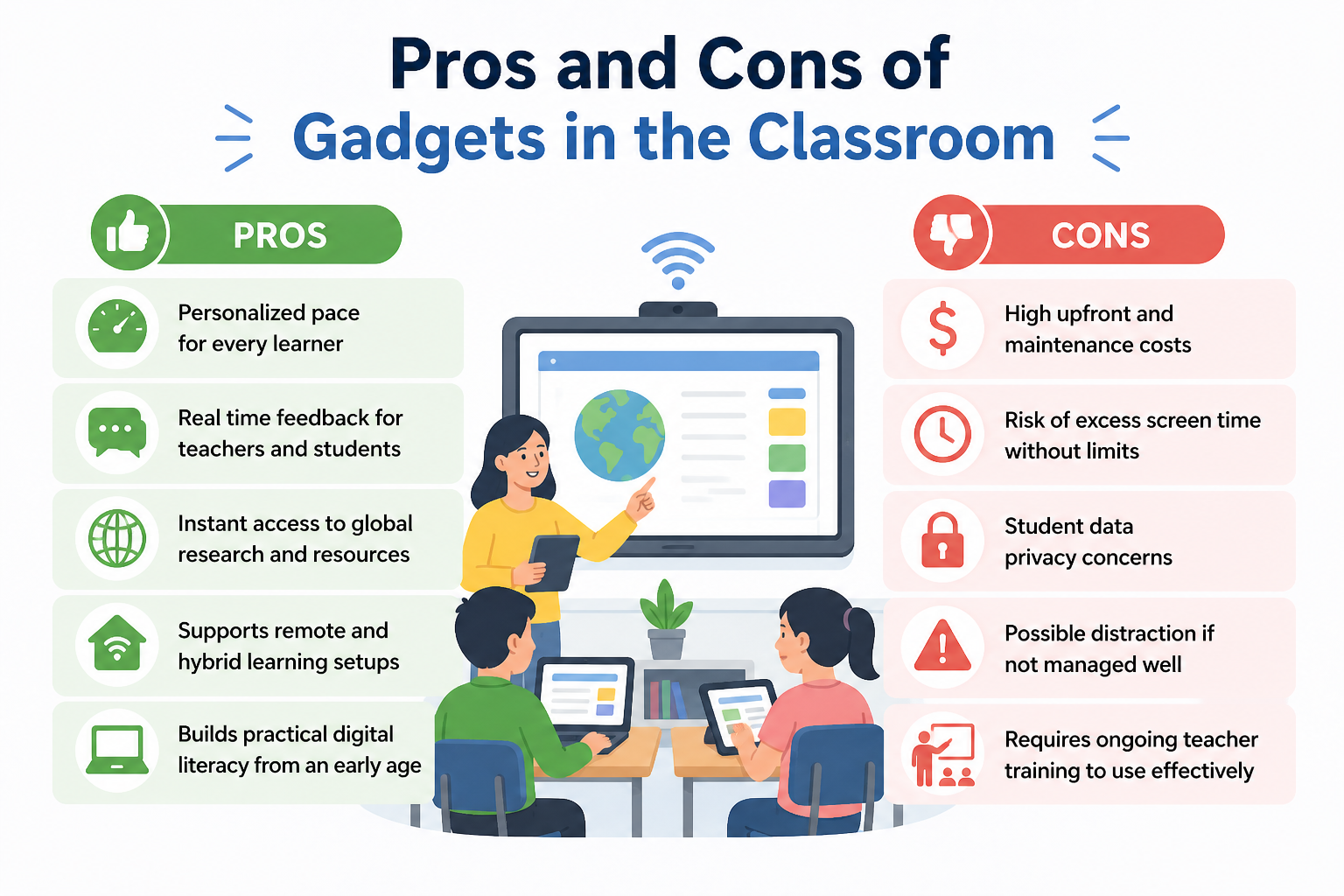
Pros and Cons of Gadgets in the Classroom
Every gadget brings a trade off worth knowing before it enters a classroom, since the same device that boosts learning can quietly create new challenges if left unmanaged.
Pros
- Personalized pace for every learner
- Real time feedback for teachers and students
- Instant access to global research and resources
- Supports remote and hybrid learning setups
- Builds practical digital literacy from an early age
Cons
- High upfront and maintenance costs
- Risk of excess screen time without limits
- Student data privacy concerns
- Possible distraction if not managed well
- Requires ongoing teacher training to use effectively
Future of Gadgets in Education
Classrooms are just beginning to experiment with technology, and the sophisticated tools of one day could turn mundane in just a few years as new gadgets and devices continue to change the way that students learn.
- AI-driven personalized learning pathways for every student enter classrooms.
- Digital and physical lessons are integrated further using wearables and spatial devices.
- Instead of taking individual tests, students’ progress is tracked continuously and in real time.
- Over time, devices become more affordable and accessible to lower and higher income people.
- Gadgets take care of repetitive grading and free teachers to focus on mentoring.
Best Educational Accessories for Students
Apart from the device, a few small educational aids will make it much easier and more comfortable to use day after day, regardless of the age of the student.
- Tablet note taking/diagramming pen.
- Durable and protected by a case and a screen cover.
- All day portable charger.
- Educational laptop stand for ergonomic sitting, long period study.
- New glasses for homework (if you need them) that are designed to block blue light from screens.
- Studying without distractions, with noise cancelling headphones.
Gadget Safety Tips for Students
You can’t just have an gadgets education, you have to use it effectively and properly. Only when it’s used safely, will a student’s data, focus and well-being be protected.
- Don’t provide personal information on learning apps or class platforms.
- Make sure devices are up to date with security updates.
- Be aware of the use of the screen and rest frequently to avoid eye strain and fatigue.
How to Choose the Right Gadgets Education
When buying some educational gadgets, it is important to make sure that you are buying something that is really needed and not necessarily the latest and most technologically advanced gadget in the shop.
- Match the problem to the specific learning problem being addressed.
- Check age appropriateness and built in safety features.
- Don’t just look at the up-front cost, it’s the long term value that you need to consider.
- Ensure that it is compatible with the current systems and apps that are in place in the school.
- If it will be taking a trip from home to school every day, search for durability.
Conclusion
Replacing teachers was never the actual purpose of educational gadgets, regardless of what some marketing copy implies. Extending what a skilled teacher can already accomplish is the real function, reaching students that a single classroom lecture alone never could. Thoughtful selection closes learning gaps, while careless adoption just becomes an expensive distraction sitting unused in a supply closet. That distinction depends entirely on how deliberately these tools get chosen and applied in practice.
Explore more Techfynix guides on student technology and digital productivity tools to plan your next classroom upgrade with more confidence.
